Getting paid should not require awkward follow-ups, manual bank transfers, or customers hunting for your BSB and account number like it's a treasure map.
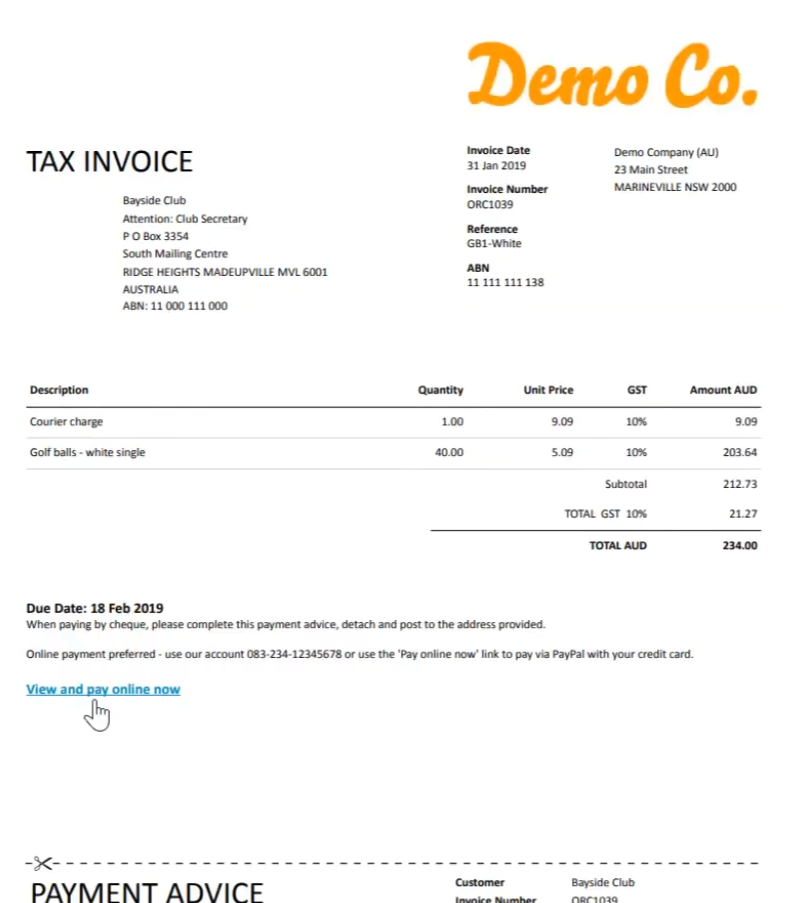
One of the simplest ways to make invoices easier to pay is to add a payment link directly to the invoice. That way, your customer can open the invoice, click the link, and pay online by card, direct debit, or another available payment method depending on your setup.
Here's how it works.
What is an invoice payment link?
An invoice payment link is a secure link that takes your customer to a payment page for that specific invoice.
Instead of asking customers to manually transfer money, you give them a clear "Pay now" option. The link can usually be added to invoices created in accounting software like Xero, QuickBooks, MYOB, or other invoicing platforms.
For Australian businesses, this can help reduce admin, speed up payment collection, and make the payment experience a lot cleaner for customers.
Why add payment links to your invoices?
Payment links make life easier for both sides.
For your business, they can help you:
- Get paid faster
- Reduce manual reconciliation
- Avoid chasing customers for payment details
- Offer card or direct debit payment options
- Give customers a simpler way to pay
- Keep invoice payments connected to your accounting system
For customers, it removes friction. No copying bank details. No guessing the reference number. No "I'll pay it later" moment because the process feels annoying.
And we all know "later" can become "after the third reminder email".
How to add a payment link to an invoice
The exact steps depend on your accounting software and payment provider, but the general process is usually this:
1. Choose a payment provider
First, you need a payment platform that can generate payment links for invoices.
Pinch Payments helps Australian businesses automate invoice payments and connect payment collection with accounting software. Pinch integrates with platforms including Xero, QuickBooks, MYOB, Cin7 Core, HubSpot, Zapier, n8n, and viaSocket.
2. Connect your accounting software
Once your payment provider is set up, connect it to your accounting or invoicing software.
This allows the payment platform to access invoice details, generate payment options, and help match payments back to the right invoice.
If you use Xero, Pinch is currently the #1 rated payments integration on the Xero App Store.
3. Set your accepted payment methods
Decide how customers can pay.
Depending on your setup, this may include:
- Credit card
- Debit card
- Direct debit from an Australian bank account
- Surcharged card payments where appropriate
- Automated recurring payments for repeat invoices
The right mix depends on your business, your customers, and how much control you want over fees and payment timing.
4. Add the payment link to your invoice
Some systems add the payment link automatically once the integration is active.
In other cases, you may need to paste the link into your invoice template, payment instructions, email body, or invoice notes section. Pinch has step-by-step guides for adding a payment link to your Xero, QuickBooks, or MYOB invoice template.
A simple version might look like:
Pay this invoice securely online: [payment link]
Or:
Click here to pay by card or direct debit: [payment link]
Keep the wording clear. The customer should know exactly what the link does.
5. Send the invoice as usual
Once the payment link is included, send the invoice through your normal process.
When the customer clicks the link, they'll be taken to the payment page. Once paid, the payment can be recorded and reconciled depending on your software and integration.
Where should the payment link go on the invoice?
Put it somewhere obvious.
Good places include:
- Near the invoice total
- In the payment instructions section
- In the invoice email
- Next to a "Pay now" button if your software supports it
Avoid burying the link in fine print. If the goal is to get paid, make the path to payment easy to spot.
Example invoice payment wording
Here are a few simple options:
Straightforward:
Pay this invoice securely online using the link below.
Friendly:
Ready to pay? Use this secure link and we'll match the payment to your invoice.
For direct debit:
Set up direct debit to pay this invoice from your Australian bank account.
For repeat customers:
You can pay this invoice online or set up automatic payments for future invoices.
A few tips before you turn it on
Before adding payment links to all invoices, check:
- Your payment methods are configured correctly
- Surcharging settings are clear and compliant
- Invoice references are being passed through properly
- Your invoice template looks clean on desktop and mobile
- Your customers know the link is legitimate
- Your reconciliation process is working as expected
It's worth testing with a small invoice first. Future-you will appreciate the tiny bit of caution.
The bottom line
Adding a payment link to your invoices is one of the easiest ways to make payment collection smoother.
For Australian businesses using accounting software, a connected payment platform like Pinch can help turn invoices from "please remember to pay this" into "click here and you're done".
Less admin. Fewer follow-ups. Easier payments.
That's the kind of invoice glow-up we can get behind.
 Curious to see how Pinch works? Check it out